Kids Name For all Religion1.5
Publisher Description


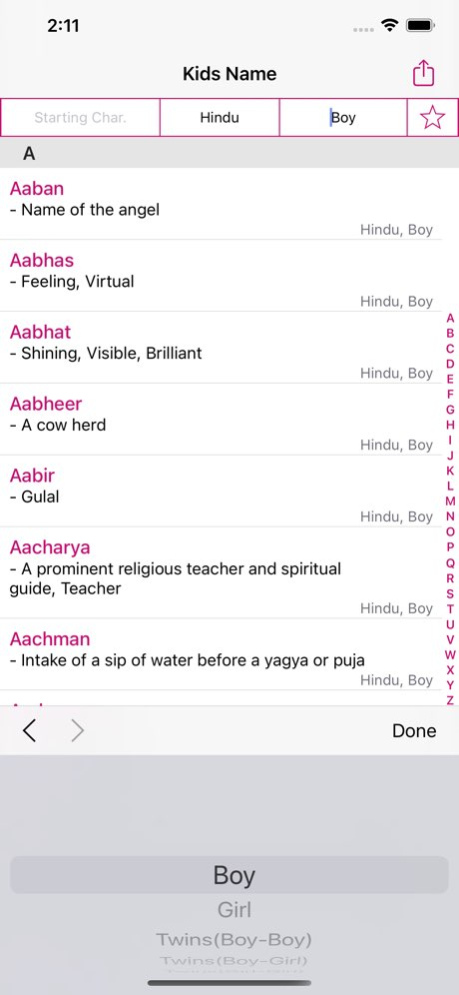
Looking for unique baby names and don’t want to look through endless lists? Install Kids Name Genius to find a name for your baby.
Find that ONE perfect name among a database of 50,000 names.
The App learns what YOU like, and helps you find the perfect name.
- Name for Boys, Girls, Twins.
- Up to 50,000 boy and girl names
- Name meanings and religion like Buddhist, Christian, Hindu, Jain, Muslim, Parsi, Sikh etc.
- Classic and unusual baby names
- Full A-Z listings
- Advanced search (Religion, Initial Letter, Gender)
Version History Crash Fixed 1.5 01/02/2025 - Added crash analytics
- Performance improved 1.4 05/07/2021 Bug fixes 1.3.9 02/27/2021 Bug fixes 1.3.8 11/22/2020 - Performance improved 1.3.7 11/21/2018 - Performance improved 1.3.6 10/26/2018 - Bug Fixes 1.3.5 09/17/2018 - Performance improved. 1.3.4 04/24/2018 - Bug fixes and stability improvement. 1.3.3 11/21/2017 Thank you all for great support.
- Design changes
- Bug fixed. 1.3.2 10/03/2017 Thank you all for great support.
- Bug fixes. 1.3.1 08/31/2017 Thanks For Great Support...
Minor Bug Fixed. 1.3 08/28/2017 Performance Improved 1.2 08/18/2017 - Name Sharing option added
- Performance Improvement 1.1 06/30/2017 1.0 06/23/2017
About Kids Name For all Religion
The company that develops Kids Name For all Religion is Mobilogy Software Services LLP. The latest version released by its developer is 1.5.
To install Kids Name For all Religion on your iOS device, just click the green Continue To App button above to start the installation process. The app is listed on our website since 2026-10-06 and was downloaded 6 times. We have already checked if the download link is safe, however for your own protection we recommend that you scan the downloaded app with your antivirus. Your antivirus may detect the Kids Name For all Religion as malware if the download link is broken.
How to install Kids Name For all Religion on your iOS device:
- Click on the Continue To App button on our website. This will redirect you to the App Store.
- Once the Kids Name For all Religion is shown in the iTunes listing of your iOS device, you can start its download and installation. Tap on the GET button to the right of the app to start downloading it.
- If you are not logged-in the iOS appstore app, you'll be prompted for your your Apple ID and/or password.
- After Kids Name For all Religion is downloaded, you'll see an INSTALL button to the right. Tap on it to start the actual installation of the iOS app.
- Once installation is finished you can tap on the OPEN button to start it. Its icon will also be added to your device home screen.
Program Details
System requirements
Download information
Pricing
Version History
version 1.5
posted on 2026-10-06
Version History Crash Fixed 1.5 01/02/2025 - Added crash analytics
- Performance improved 1.4 05/07/2021 Bug fixes 1.3.9 02/27/2021 Bug fixes 1.3.8 11/22/2020 - Performance improved 1.3.7 11/21/2018 - Performance improved 1.3.6 10/26/2018 - Bug Fixes 1.3.5 09/17/2018 - Performance improved. 1.3.4 04/24/2018 - Bug fixes and stability improvement. 1.3.3 11/21/2017 Thank you all for great support.
- Design changes
- Bug fixed. 1.3.2 10/03/2017 Thank you all for great support.
- Bug fixes. 1.3.1 08/31/2017 Thanks For Great Support...
Minor Bug Fixed. 1.3 08/28/2017 Performance Improved 1.2 08/18/2017 - Name Sharing option added
- Performance Improvement 1.1 06/30/2017 1.0 06/23/2017
version 1.5
posted on 2025-01-02
Crash Fixed
version 1.5
posted on 2025-01-02
Jan 2, 2025
Version 1.5
Crash Fixed
version 1.4
posted on 2021-05-07
May 7, 2021 Version 1.4
- Added crash analytics
- Performance improved
